Google Drive Video to MP4 Downloader
Paste a shared Google Drive video link and save a local MP4 copy in 360p, 480p, 720p, or 1080p.
No software needed. Works on desktop and mobile.
Paste Your Google Drive Link
Make sure the video is set to “Anyone with the link” before pasting.
How It Works
Download your first video in under 30 seconds
Open Your Google Drive Video
Navigate to the video file in Google Drive you want to save.
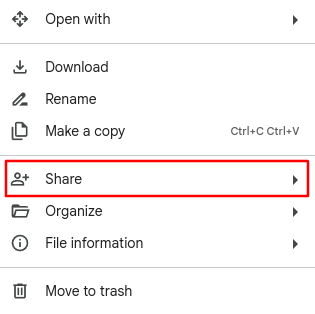
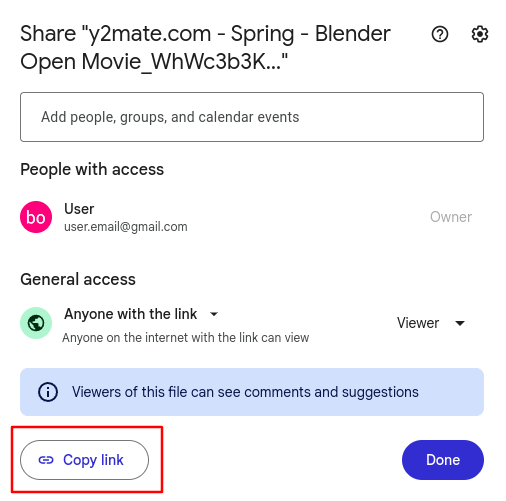
Share & Copy the Link
Click “Share”, set access to “Anyone with the link”, and copy the URL.
Paste & Choose Quality
Paste the link above, pick your preferred resolution, and download!
Choose quality:
Google Drive to MP4, Made Simple
If you need to convert a Google Drive video to MP4, you usually want a local video file that opens in common players, editors, phones, tablets, and presentation apps. DriveDownloader turns a shareable Google Drive video link into downloadable MP4 options when Google Drive has processed compatible video versions for that file.
This is different from uploading a file to a traditional converter. Your video does not need to be sent to another conversion server. We detect the available Drive video qualities and let your browser save the selected MP4 copy directly to your device.
How to Convert a Drive Video to MP4
Copy the Google Drive video link
Use a file link, not a folder link, and make sure the video can be viewed by anyone with the link.
Paste it into DriveDownloader
We check the video and show the MP4 download qualities available from Google Drive.
Choose a quality and save the MP4
Pick 360p, 480p, 720p, or 1080p when available, then download the file to your device.
For Offline Viewing
Save shared Drive videos before travel, class, meetings, or low-signal situations where streaming is unreliable.
For Editing Workflows
Download MP4 copies of client footage, lectures, webinars, or team recordings for local review and editing.
For Device Compatibility
MP4 is widely supported across phones, browsers, media players, slides, and learning platforms.
From the Blog
Tips, guides, and updates about Google Drive and video downloading.


Why DriveDownloader?
Everything you need to download Google Drive videos effortlessly
DriveDownloader was built to solve a simple problem: saving a Google Drive video as an MP4 shouldn't require installing software, creating an account, or jumping through hoops. Whether you're a student saving a lecture, a creator backing up footage, or a professional archiving a webinar, our tool is designed to get you from Drive link to local MP4 file in under a minute.
High-Speed Downloads
Our optimized multi-threading engine delivers lightning-fast speeds even for large HD files.
Easy Drive Integration
Just paste a public sharing link. No Google account login needed for publicly shared videos.
All Devices Supported
Works on desktop, tablet, and mobile across Windows, macOS, iOS, and Android platforms.
Private & Secure
We never store your files or data. Downloads go directly from Google Drive to your device.
MP4 Quality Options
Choose from 360p, 480p, 720p or 1080p MP4 downloads to balance file size and quality.
No Account Required
No sign-up, no email, no subscription. Just paste a link and start downloading immediately.
Unlimited Downloads
Download as many videos as you need. There are no daily caps or video count restrictions.
Privacy First
We don't track which files you download or log your activity. Your downloads remain your business.
Who Uses DriveDownloader?
From students to business professionals, thousands rely on us every day
Students & Learners
Download lecture recordings, tutorial videos, and course materials shared by instructors on Google Drive. Save MP4 copies for offline study, travel, or areas with no internet.
Content Creators
Retrieve raw footage, collaboration clips, and b-roll videos shared by team members via Google Drive. Convert Drive links to MP4 downloads for smoother local editing.
Teachers & Educators
Back up recorded online classes, educational webinars, and training sessions shared on Google Drive for future references or re-use in offline classroom settings.
Business Teams
Download video reports, product demos, and client presentations stored on Google Drive for analysis, local archiving, or presenting in meetings without an internet connection.
Ready to download your first video? It takes less than 30 seconds.
Start Downloading FreeAbout DriveDownloader
DriveDownloader is a free, browser-based Google Drive to MP4 tool that lets you download videos stored on Google Drive directly to your device — with no software installation, no account required, and no limits.
What Is DriveDownloader?
DriveDownloader is an online service designed to solve a common frustration: Google Drive does not always make it straightforward to download a shared video, especially if it was shared with you by someone else or if you want to save it locally for offline viewing. Our platform bridges that gap. By simply pasting a publicly shared Google Drive link into our tool, we detect the video file, retrieve the available quality levels, and allow you to download an MP4 copy directly to your computer or mobile device.
How Does It Work?
Our service communicates with Google's infrastructure using their official APIs to retrieve streamable video data. We then present you with all available MP4 quality options — typically 360p, 480p, 720p, and 1080p — and initiate a secure, direct download to your browser. No file ever passes through our servers: the data flows directly from Google's storage to your device, making the process as fast and private as possible.
Is It Safe to Use?
Absolutely. DriveDownloader does not require you to log in to any Google account for publicly shared videos. We do not collect, store, or transmit any of your file data or personal information. The download is handled entirely by your browser. For private video downloads, we use Google's official OAuth 2.0 process, which means your credentials are never seen or stored by us — Google handles all authentication directly.
Why Multi-Resolution Support Matters
Not everyone has a fast internet connection, and not every device needs a huge MP4 file. We provide multiple quality tiers so you can choose the right balance between file size and video clarity. A 360p file might be perfect for a quick review, while a 1080p version is better suited for archiving or editing. This flexibility is one of the core reasons our users keep coming back.
Quick Facts
- No registration or login needed
- Works with any publicly shared Google Drive link
- Save Drive videos as MP4 files
- Choose from 360p, 480p, 720p, 1080p
- No file size limits imposed by us
- Files are never stored on our servers
- Private video support via Google OAuth
- Works on desktop, tablet & mobile
- 100% free, no subscription
Pro Tip: Check Sharing Permissions First
Before pasting a link, make sure the file is shared with "Anyone with the link" and the permission is set to "Viewer". If the link is restricted to specific people, DriveDownloader won't be able to access the video.
To check: open Google Drive → right-click the file → Share → change access from Restricted to Anyone with the link.
Responsible Use
DriveDownloader is intended for downloading videos you own or have permission to save. Please respect copyright laws and only download content you are legally entitled to access and store.
What Our Users Say
Thousands of users trust DriveDownloader every day
"As a student, I rely on online resources. DriveDownloader has been a lifesaver for downloading lecture videos. The interface is simple and the downloads are quick."

Jimmie Miller
Student"DriveDownloader has revolutionized my workflow. I can now easily download high-quality videos from Google Drive for my editing projects. The speed is impressive."

Kris Li
Content Creator"Our team needed to analyze a video for a marketing campaign. DriveDownloader allowed us to download it quickly and securely. A truly valuable tool for business."

Tammy Hoffman
Business OwnerFrequently Asked Questions
Everything you need to know about DriveDownloader
https://drive.google.com/file/d/FILE_ID/view. The file
must be a video (e.g., MP4, WebM) and must be set to “Anyone with the link”
for public downloads. Links to folders or Google Docs are not supported.There are a few common reasons a video may not be detected:
- Restricted sharing: The file is not set to “Anyone with the link”. Open Google Drive, right-click the file, click Share, and change the access setting.
- Not a video file: The link points to a Google Doc, Spreadsheet, or Folder rather than a video file.
- Invalid link format: Make sure you're pasting the full sharing URL, not just a file ID or a drive folder link.
- Google processing: A newly uploaded video may still be processing by Google and may not be available yet.